Pre-Populating CRM Records From Website Data at the Point of Signup
Automatically populate CRM records with fresh website data at signup.

CRM data breaks down faster than most sales teams realize, and it starts breaking down the moment it's entered. According to research cited in the field, 91% of CRM data is incomplete, and poor data quality costs businesses an estimated $700 billion a year. No amount of spring cleaning fixes that. It's just how contact records age.
People switch jobs. Companies get bought, renamed, or quietly shut down. Phone numbers get reassigned. None of this happens on a schedule, so the decay never stops. Reps compensate the way they always have: pulling up LinkedIn, clicking through a prospect's "About" page, piecing together a picture by hand before a call. That's web-sourced data already, just gathered one browser tab at a time by someone who could be doing something else with that hour. Automated enrichment removes that bottleneck, and estimates put the savings at over 20 hours a month per rep. That's what this piece is about: enrichment running automatically, right at signup, pulling from a source most teams already have open in a tab and never think to script.
What gets added to a record when you enrich at signup
Enrichment covers four different kinds of data, and mixing them up is how teams end up with records that look full but aren't useful.
Firmographic data covers company size, industry, revenue, headquarters, and whether the account is a subsidiary of something bigger. This is what drives lead routing and ICP filters, the stuff deciding which rep gets the lead in the first place.
Technographic data is the tech stack a company runs: its CRM, its marketing automation tool, its cloud provider. This turns a cold email specific ("noticed you're on HubSpot") and opens the door to a competitive displacement pitch.
Contact and demographic data means job title, seniority, a verified email, a direct dial. This is what gets a rep past the front desk and to the person who actually signs.
Intent signals track what a company is researching right now, surge scoring that flags accounts showing buying behavior before they've filled out a form.
There's also a split in how enrichment gets applied. Static enrichment appends data from an outside database at the moment of capture: a one-time snapshot. Dynamic enrichment keeps updating based on what happens after, what a prospect says on a call, what pages they visit next. Per Sybill's analysis, dynamic enrichment moves the needle more on pipeline accuracy, because it tracks what buyers actually do instead of relying on a record that goes stale the day after it's pulled.
Clean before you enrich. Skip that step and enrichment just adds fields on top of duplicate accounts and mismatched domains, a bigger, more convincing mess than the one you started with.
The signup moment as the highest-leverage point for enrichment
Consider what's true the second someone submits a signup form. Their identity is known. Their intent is as fresh as it will ever be. Whatever enrichment happens right then feeds the very first decisions a system makes about that lead: how it's routed, how it's scored, who gets pinged to follow up.
Per Default's framing, most teams enrich too late. By the time a lead has sat in the CRM for a day or two, the moment where speed mattered has already passed. Thin records at signup cause specific, traceable damage: routing rules misfire when firmographic fields are blank, scoring models degrade because they're working off stale account data, and forecasts built on top of both inherit the error.
Real-time enrichment, triggered the instant the form submits, is not the same thing as batch processing, which runs on a schedule and updates records in bulk later. Batch has its place for maintenance and cleanup. But the signup window specifically rewards speed, because routing and first-touch scoring happen right then, not next Tuesday during the scheduled sync.
The prospect's own website as an underused enrichment source
Standard enrichment reaches into a third-party database, something someone else compiled and updates on its own timeline. A prospect's website is different. It's a primary source, and it reflects what the company says about itself today, not six months ago.
Look at what's actually sitting on a typical company site. The homepage and "About" page carry firmographic signals: a company description, an industry label the company assigns itself, office locations, sometimes a funding announcement. Job listings name the tools a team uses day to day, a technographic signal most vendors have to infer instead of just read. Integration pages and partner badges do the same. Leadership bios, org charts, and recent blog posts round out the picture.
Teams have mostly skipped this source for practical reasons. Reading a website at scale meant building and maintaining a scraper: handling redirects, handling layout changes, handling sites that block anything that isn't a browser. That's real infrastructure work, and most sales-ops teams reasonably chose to pay for a vendor subscription instead of building it themselves.
That choice created a gap, though. Vendor databases update on their own cadence, weeks or months between refreshes in some cases. A company's own website updates the day the company changes something. For a fast-moving startup, that gap between what the vendor has on file and what's true right now can turn a pitch relevant or embarrassing.
The infrastructure barrier that justified skipping this source is mostly gone. Web scraping is available as a single API call now, and that changes the math on whether it's worth doing.
Converting a company URL into CRM-ready fields with a web scraping API
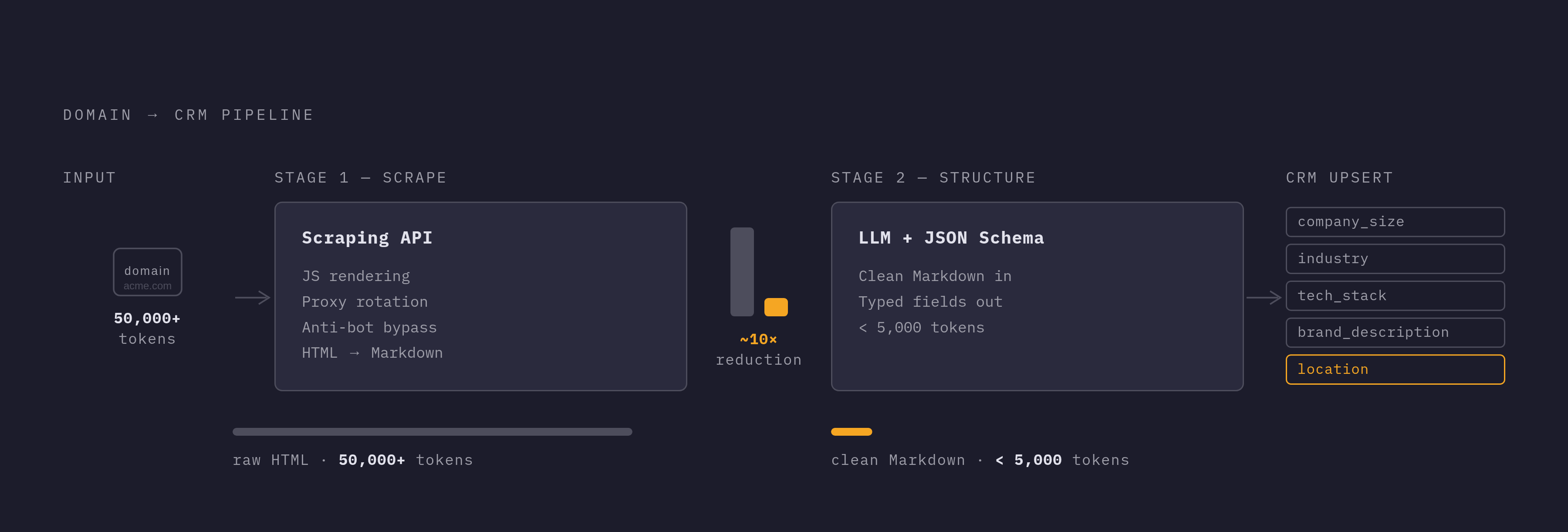
Two stages produce this. Stage one pulls raw content off a URL: handling JavaScript rendering, rotating proxies, getting past whatever anti-bot measures a site has in place. Stage two takes that clean content and runs it through an LLM that pulls out specific fields according to a schema defined ahead of time.
Skipping stage one and feeding raw HTML straight to an LLM doesn't work well. A 10-page company site as raw HTML can run past 50,000 tokens once every script tag and layout div gets counted. Convert that same content to clean Markdown first, and it often drops under 5,000 tokens, something close to a tenfold cut. That matters once payment is per token across thousands of signup events a month, not just one test call.
The schema does the heavy lifting on output. Define a JSON schema with the fields wanted, company_size, industry, tech_stack, brand_description, location, and the API hands back typed, structured data that maps straight into CRM fields. No regex, no custom parsing script that breaks the next time a site redesigns its footer.
For signup enrichment, a handful of fields do most of the work: the company description for an account summary or segment tag, the industry self-label as an input to ICP scoring, technology mentions pulled straight from the site instead of a separate technographic vendor, headcount signals lifted off a careers page as a rough proxy for company size, and brand assets like a logo or primary color for personalized outreach material.
Most company sites today are single-page applications with content that loads in after the initial request. A plain HTTP fetch on a site like that returns an empty shell, no actual content. A scraping API built for production handles the JavaScript rendering in the cloud, so there's no headless browser to configure or maintain on your end.
Wiring the enrichment call into the signup flow
The trigger is simple: a form submission, or a webhook from whatever signup system is in use, kicks off an enrichment job with the prospect's domain as input.
From there, the flow runs in a few steps. Pull the domain out of the email address the prospect submitted, stripping subdomains and handling the common edge cases. Call the scraping API with that domain and the JSON schema defining the CRM fields to fill. Get back a structured JSON response with firmographic, technographic, and brand fields already parsed. Write those fields into the CRM record through its API, using an upsert pattern that only fills empty fields, so a rep's manual notes never get overwritten. From there, optionally kick off a re-evaluation of lead scoring or routing rules now that the record actually has data in it.
Latency matters, but the fix is simple: run it async. The scraping call shouldn't block the confirmation page the prospect sees after hitting submit. Fire it in the background and let the CRM record update within a few seconds.
Validation matters just as much as speed. Check that employee count comes back as a number, that industry matches one of the categories on the allowed list, before writing anything to the record. Appending unvalidated fields doesn't fix a messy CRM, it just adds new mess in a different shape, a point that lines up with ZoomInfo's own guidance on data quality.
For sites where the homepage alone doesn't carry enough, the same pattern extends: a search step finds the right pages on a larger site, an extraction step converts just those pages to clean Markdown scoped to what's actually being looked for. Same two-stage logic, just applied across more than one page.
What website scraping enriches that third-party vendors cannot
Vendor databases still do things a homepage scrape can't touch. ZoomInfo, for instance, covers a very large number of contacts and companies, with a substantial share of those contacts carrying verified phone numbers and an even larger share carrying verified business emails, accuracy in the low-to-mid 90s through multi-source verification. That kind of contact-level scale doesn't come from reading a company's "Contact Us" page.
But vendors consistently miss or lag on a specific class of information: how a company describes itself in its own words right now, distinct from the boilerplate a vendor recorded at onboarding. Current product lines and pricing tiers, especially for SaaS companies shipping changes monthly. Tech stack signals sitting in job postings and integration pages, often more current than a technographic database's last crawl. Visual brand assets aren't in any firmographic dataset at all. These include logos and color palettes. And strategic signals, a new partnership announced last week, a funding round mentioned on the site, a hiring surge visible on the careers page, appear on the website before they appear anywhere else.
Treat the two as separate layers doing separate jobs. One gives reach and contact-level accuracy at scale. The other gives currency and specificity that only exists at the source. Picking one over the other misses the point; the pipeline needs both.
Keeping enriched records fresh after the initial signup
A record enriched at signup starts decaying the moment it's written, same as anything typed in by hand. People change roles. Companies pivot their positioning. Tech stacks get swapped out. None of that pauses just because the record got filled in correctly on day one.
The fix is scheduled re-crawling. Set up a monthly or quarterly re-crawl of key account domains to catch shifts in positioning, new product launches, or headcount changes. Layer in alerts for changes that touch ICP-relevant fields specifically: a company that suddenly starts talking about "enterprise" instead of "small teams," or one that adds an integration signaling a tech stack shift.
Website change detection deserves treatment as a pipeline signal in its own right, with weight beyond a footnote. A prospect that rewrites its pricing page or launches a new product line is telling you something, and that something belongs in front of the rep working the account, not quietly logged and forgotten.
This lines up with the earlier point about dynamic enrichment mattering more than static enrichment for pipeline accuracy, per Sybill's analysis. Scheduled re-crawls are dynamic enrichment applied to the website layer specifically. And none of this needs new tooling: it's the same scraping API infrastructure from the signup flow, just running on a schedule against a list of domains pulled from active CRM accounts instead of firing once at intake.
Choosing the right enrichment stack for a signup-to-CRM pipeline
No single vendor covers everything, and stitching together five tools is the wrong instinct, even though it's the one most teams follow.
Clearbit handles real-time lead enrichment triggered by website visits and form fills, with firmographic and technographic coverage through its API. Pricing runs on credits bundled with a HubSpot subscription, and it fits teams already working inside the HubSpot ecosystem.
ZoomInfo covers firmographic and contact data at scale, org charts included, plus intent signals, priced on a custom basis. It's built for outreach teams running multi-threaded, account-based marketing programs.
Apollo.io combines prospecting and enrichment with built-in email sequencing, and it offers a free tier, which makes it a common starting point for cold outbound work.
Cognism focuses on GDPR-compliant data for European contacts, which matters for any team with meaningful EU pipeline.
Lusha handles quick lookups, phone numbers and emails, including mobile number enrichment, also with a free tier, suited to teams that mainly need direct dials fast.
The decision comes down to what's actually missing, a different question from what looks impressive on a vendor deck. Need contact-level data, phone numbers, verified emails, titles, at real scale? That's a vendor database: ZoomInfo, Lusha, or Apollo. Need GDPR-compliant EU contact records specifically? Cognism. Need a real-time flow from form capture straight into routing? Clearbit or Default. Need enrichment that updates dynamically off actual sales conversations? Sybill.
The pipelines that hold up under real volume don't run five tools stitched together. They run a web scraping API for the website layer plus one contact vendor for phone and email, full stop. Every additional vendor is another API contract, another data format, another point where the pipeline quietly breaks at 2 a.m. and nobody notices until the routing rules stop firing. One well-built API handling the web data layer cuts that fragmentation down to something a small team can actually maintain.