Domain-Based Company Autofill in B2B Signup Forms
Autofill powered by work email domains eliminates the marketing-sales tradeoff on form length.

Every field on a signup form does one of two things: it makes marketing's conversion numbers worse, or it makes sales' job easier. Domain-based autofill is the rare fix that breaks that trade instead of splitting the difference: a single work email does the work of multiple form fields, pulling company name, size, and industry from data that already sits on the open web. Most teams wrongly treat this as a nice-to-have polish feature. Pull the enrichment layer out, and the whole "short form, smart routing" pitch collapses back into the old fight between marketing and sales.
When someone types a work email into a signup form, the system strips everything after the @ sign and runs that domain through an enrichment API in real time. Before the person clicks "next," the lookup returns structured data: company name, industry classification, employee headcount, revenue range, funding stage, and tech stack. Those values write directly into the form fields, which can be left visible and editable or hidden entirely, and the enriched record lands in the CRM before the confirmation screen even loads. Sales gets a lead that already reads "50 employees, Series B, runs Salesforce and Segment" the moment it arrives, routed and scored against real firmographic data, without the prospect ever being asked to type any of it.
That fight is old news, and it's mostly pointless. Marketing strips fields to protect conversion. Sales adds them back, because a lead with no company data attached is close to useless to qualify. Neither side wins, and most of the argument is moot anyway: the real leak sits upstream of the form, in the traffic that never fills it out at all. Fixing the form doesn't fix that.
What domain-based autofill actually does and when it fires
Someone types a work email into a signup field. The system grabs everything after the @ sign, the domain, and runs it through an enrichment lookup. Before that person clicks "next," the rest of the form is already filled in with real company data.
This runs in real time, fired by the action itself, not a nightly batch job. It triggers at the point of signup, whenever a prospect first submits their work email. By the time the welcome screen loads, the lead record sitting in the CRM already has shape to it.
What a domain lookup typically fills in:
- Company name, industry classification, employee headcount, revenue range, funding stage, tech stack (technographics)
- Logo, brand assets, social profile links
Worth separating this from things it resembles. It's not a form-builder feature: it lives in a separate enrichment layer that talks to the form rather than sitting inside the form's own rendering logic. It's not progressive profiling either, which spreads questions out over multiple visits and sessions; this answers questions the user never even sees asked. And it only works for business signups. A personal email address from a consumer webmail provider doesn't map to a company, so there's nothing on the other end to look up.
Before any of that fires, the pipeline runs a quick check: real company domain, or personal email provider? Personal, and enrichment gets skipped, the form falls back to asking the person directly. No match at all, brand-new company, something obscure, same fallback kicks in.
A quieter second use rides on the same mechanism: fraud and lead qualification. Does the company someone claims work at that domain actually exist there? Does the email pattern look legitimate for that domain? Does the domain itself check out? None of that shows up on the form. It's just running underneath it.
The data enrichment API landscape that powers autofill
None of this works without a data source behind it, and the source is the whole ballgame. Coverage, accuracy, freshness, cost: pick a provider and a team is really picking a ceiling on all four at once.
Breeze Intelligence started life as Clearbit, long the standard name in enrichment, before HubSpot acquired it and folded it into its own product line. It pulls firmographic and technographic data from a range of underlying sources. The timeline matters if a team is building around it. Clearbit Connect shut down in December 2024, the free version of the platform ended April 30, 2025, and remaining free endpoints are being wound down. Access is now paid and tied to HubSpot's platform. Enrichment stopped being a standalone API and became a CRM feature, which is a real migration headache for any team that had Clearbit plugged into tools outside HubSpot.
Apollo.io covers contact and company data, with bulk enrichment available through its API alongside various plan tiers.
Hunter.io works domain-first, surfacing email data tied to a given organization's domain. Its Enrichment API covers both email and company data, but most teams treat it as a supplemental layer rather than a primary source.
UpLead emphasizes data accuracy and offers a verification-backed refund policy.
Lead411 pairs contact data with buying-signal alerts tied to company activity.
GetProspect does bulk enrichment from a CSV using company name or domain, returning multiple data points per record.
Infobel is the outlier on scale, a B2B data provider with more than 375 million businesses and over 172 million places in its database. Founded in July 1995 and based in Brussels, it's been under parent company Datasharp since 2025. Useful for teams that need international coverage or compliance-grade checks, not just a name and a logo.
No single provider covers everything, which is exactly why waterfall enrichment has become a common pattern: query one provider, and if it comes up empty, fall through to the next. Relying on a single source instead of a waterfall is the mistake teams keep making, because it leaves real, findable data on the table for no reason other than not wanting to wire up a second API call.
One caveat applies across every provider on this list: B2B data decays fast, somewhere between 22% and 30% a year. Autofill built on top of any of these APIs is only as current as the last time enrichment actually ran, which means a logo or headcount figure pulled six months ago is already showing its age.
Autofilling brand identity, logo, colors, and visual assets from the domain
Firmographic data and brand data are two different problems, even though both start from the same domain. An enrichment API hands back structured text fields. Getting a logo or a brand's color palette means actually crawling the site, parsing its CSS, and pulling image assets straight out of the page.
Building that in-house means standing up a crawler for each site, parsers to pull name and description out of the HTML, image processing to isolate logos and colors, and a re-crawl schedule to catch a rebrand. Each piece breaks on its own timeline, and a stale logo sitting in an onboarding screen reads to the user like a bug, even when it's really just a caching problem nobody noticed. Building this in-house is usually a waste of engineering time: the crawling, parsing, and re-crawl scheduling are solved problems, and a dedicated API does it faster and keeps it current without anyone on the team owning the upkeep.
A single call to a dedicated brand extraction service typically returns:
- Logo URL (several formats and resolutions), favicon, Open Graph image, dominant color palette with roles inferred (primary, text, background)
- Font families used on the live page, social profile links, meta tags
Brandprint pulls colors, fonts, and logos from any site and is designed for broad site coverage and fast turnaround. The service is designed for broad site coverage and fast turnaround.
Webclaw's Brand API returns detected colors, font families, logo URL, and favicon in a single API call.
CaptureWeb's Brand Extraction API is designed to handle sites that require full rendering before brand assets can be reliably extracted.
Enrich.so's Logo API delivers logos in PNG, SVG, and JPEG, at resolutions from a 16x16 favicon up to 512x512 and beyond, pulling from brand databases, live company websites, and verified social profiles at once.
Where this actually shows up: onboarding screens that hand a user back their own company logo, multi-tenant dashboards, company directory features, CRM sidebar widgets. Anywhere a product needs to render a brand visually right after someone signs up.
How to wire domain-based autofill into a signup flow
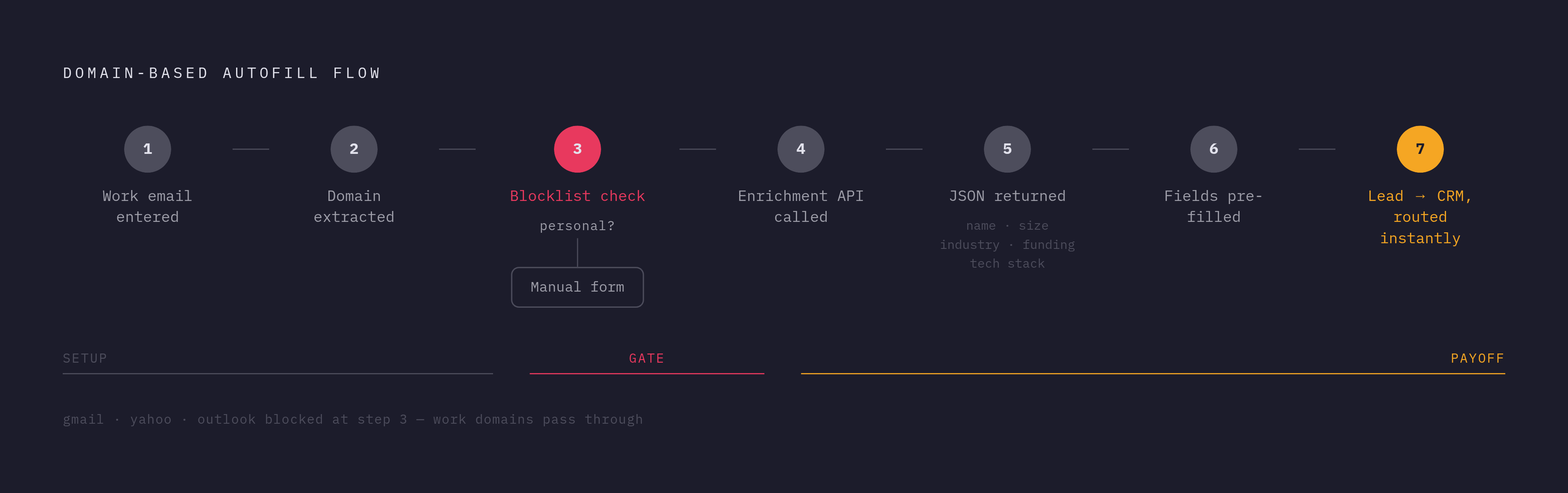
The mechanics, step by step:
- Capture the work email. The form shows one field. Nothing else is required to render.
- Pull the domain on blur or submit. Strip everything after the @ sign, client-side or server-side, whichever fits the stack.
- Filter out personal email providers. Check the domain against a blocklist, gmail.com, yahoo.com, outlook.com, before firing anything downstream.
- Call the enrichment API. Pass the domain, get back structured JSON.
- Fill in the form. Write the returned values into the relevant fields. Some teams hide fields once they're pre-filled; others leave them visible but editable, so a user can correct anything wrong.
- Push to the CRM and route the lead. The enriched record lands before the page even finishes loading, and scoring runs against real data instead of a bare email address.
There's a layer underneath this that's easy to overlook: enrichment APIs are themselves downstream of raw web data. A company's homepage, LinkedIn page, Crunchbase entry, careers page, all of it gets crawled and indexed somewhere before any enrichment database can return it in a lookup. Teams needing coverage past what commercial APIs offer end up building their own layer that turns a live URL into structured data on demand: define a schema (company_name, industry, employee_count, logo_url) and pull it straight from the domain's homepage instead of waiting on a third party to have already indexed it.
Misses happen, and that's fine. Small companies, brand-new domains, oddly configured sites: plenty of these return partial data or nothing at all. The fix isn't making enrichment mandatory. Treat it as best-effort: fields show up blank and labeled when there's no match, and the user fills them in like on any other form.
The waterfall pattern applies at implementation time too. Query the primary source first, and if key fields like employee count or industry come back empty, fall through to a second provider before the form renders. Because enrichment data decays at that 22-to-30%-a-year clip, teams running high-velocity sales motions should re-enrich existing CRM records monthly rather than let them sit untouched and rot. Waiting longer than that isn't a minor tradeoff, it's how a CRM quietly fills up with stale headcounts and dead tech-stack fields nobody trusts anymore.
The real target is fewer, better-chosen fields. It's getting the form out of the way while enrichment carries the weight three or four fields used to carry.
What does sales actually get out of a shortened form?
A shorter form isn't just a marketing win. It changes what lands in the sales queue. Instead of a name and an email, a rep opens a lead record that already carries company size, industry, funding stage, and tech stack, all filled in before the person who submitted the form even sees a confirmation screen.
That timing matters more than it sounds like it should. Routing and scoring run immediately on real firmographic data, instead of waiting for someone to manually research the company later or fire off a follow-up email just to ask what the prospect would've typed into a longer form anyway. A lead that reads "50 employees, Series B, runs Salesforce and Segment" routes differently than one that's just a name and an email, and it routes that way the second it arrives, not an hour later once someone gets around to looking it up.
The old tradeoff, short form or good lead data, pick one, mostly stops applying here. Marketing keeps its short form and its better conversion numbers. Sales gets a record that's already usable the moment it lands. Neither side is settling for a middle-ground compromise anymore, because the domain the prospect typed in was already carrying most of the answer.