Rendering Live Brand Assets in Product UIs Without Storing Them
Fetch brand assets live from their source instead of storing stale copies locally.

A merchant rebrands overnight, new logo, new palette, new typeface, and by the next morning, the quiz builder or onboarding screen that represents that merchant still shows the old mark. Nobody made a mistake. The UI did what it was built to do: it read a stored copy of an asset that no longer matches reality. Brands update logos, color palettes, and typography on an ongoing basis, and any product UI that holds local copies of those assets starts drifting the moment a rebrand happens somewhere else, on a system nobody on the product team controls.
The drift is the predictable result of storing a copy of something whose source of truth lives outside your organization, not a process failure that better discipline would fix. A single-brand product might tolerate that for a while. A multi-tenant SaaS platform or a marketplace that surfaces dozens or hundreds of third-party brand identities doesn't get that grace period: every brand among those hundreds that rebrands creates one more stale asset sitting in the store, waiting to embarrass the product in front of that brand's own customers. The maintenance tail on this problem grows with the number of brands the product surfaces, not with the size of the engineering team assigned to fix it. Adding ten engineers doesn't slow the rate at which brands change their logos.
The usual responses, scheduled re-syncs, dedicated brand portals, manual upload flows, treat the symptom instead of the architecture underneath it. A re-sync schedule, by definition, imposes a staleness window: a brand that rebrands between Tuesday's sync and next Tuesday's sync looks wrong for up to a week, and there's no way to shrink that window without just running syncs constantly, which defeats the point of scheduling them. Manual upload flows push the burden onto the brand owner, and they have to treat a third party's asset store as a priority on their calendar. Most won't. A rebrand is a marketing event for the brand that owns it. For every other product displaying that brand's identity, it is an unplanned maintenance ticket that nobody filed.
On-demand brand asset fetching: what it is and what it is not
On-demand brand asset fetching resolves a domain name into a structured brand kit, logo, color palette, fonts, metadata, at the exact moment the UI needs to render it, instead of pulling that information from a local store. The call pattern is simple: a domain goes to an API endpoint, and the response comes back as structured JSON carrying logo URLs, hex color values, font names, and firmographic metadata, ready to inject straight into whatever component needs it. There's no intermediate storage step. The response gets consumed at render time and then discarded; the next render either makes a fresh call or reads from a cache that expires on its own.
This isn't a CDN-hosted asset strategy. CDNs cache files for fast delivery, but they don't extract brand data or detect when it changes. A logo sitting on a CDN is still a stored logo, just a fast one, and it goes stale the same way a logo sitting on a local disk does.
It also isn't screenshot-based color sampling. Counting pixels in a hero image returns the colors that happen to appear in a photograph, not the colors the brand's designers actually chose. A hero image with a blue sky returns blue. The brand's actual color might be orange, used in the logo and the buttons and nowhere in that photo. The only way to recover what the designer specified is to read the CSS itself, the custom properties, the computed styles on real interface elements, the colors that dominate the stylesheet once white and black are set aside.
That distinction, what color appears in an image versus what color the brand is, is where most naive implementations fall apart. Getting it right means a system reflects design intent rather than whatever happened to be in a photo on the homepage the day it was scraped.
The three layers a brand API resolves
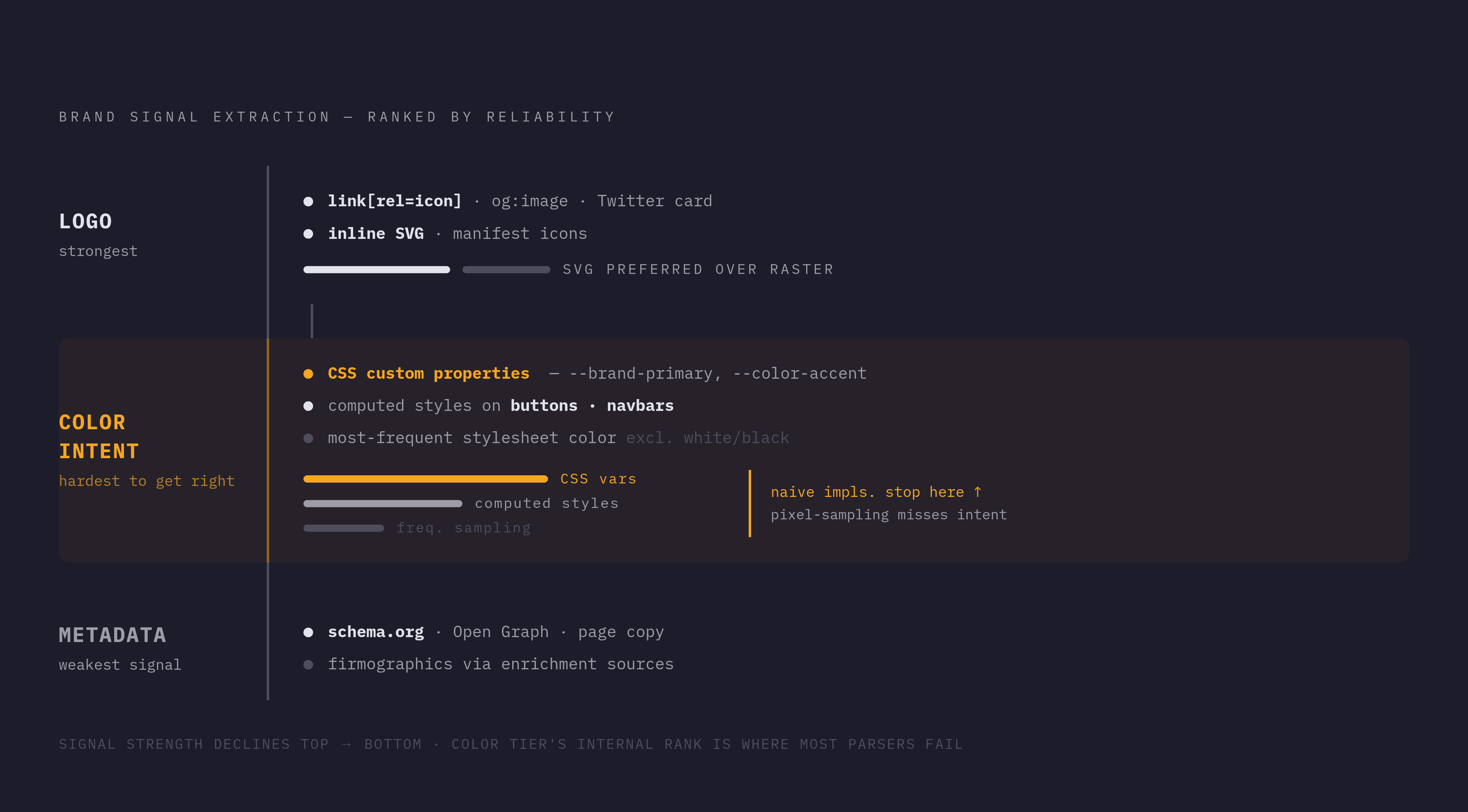
A brand extraction API that works reliably resolves three separate layers that naive scrapers tend to blur together or miss outright: the logo asset, the color intent, and the brand metadata.
The logo layer has to deal with the fact that logo candidates show up in several different places on a single page. HTML carries them in <link rel="icon"> tags, in Open Graph og:image meta tags, in Twitter card images, in manifest icons, and in inline SVGs. A reliable extractor checks all of these locations rather than stopping at the first one found, favors SVG over raster formats when both are available, and tells the actual brand mark apart from decorative images that happen to sit nearby.
The color layer pulls from three sources, and it ranks them by how strongly each one signals real brand intent. CSS custom properties like --brand-primary are the strongest signal, because a developer or designer typically names them deliberately. Computed styles on interactive elements, buttons and navigation bars, are the second signal, because brands put their color there on purpose. The third is just the most frequently used non-white, non-black color across the stylesheet. If you weigh all three signals against each other, you can separate the actual brand color from body text color or a background fill that happens to repeat often.
The metadata layer pulls company name, domain, and brand assets from structured sources: schema.org markup, Open Graph tags, and visible page copy. You usually need enrichment sources beyond the page itself for industry vertical and broader firmographic detail, because you can't guess them from whatever images appear on the site.
Open-source tooling such as OpenBrand shows you don't need a proprietary black box to solve this problem. It's available as an npm package and also ships an MCP server interface for AI agent clients, and it runs the heuristic logic across logo tags, manifests, Open Graph data, and Twitter card images to resolve the logo layer specifically.
The harder problem sits with JavaScript-rendered pages, where the brand's colors and logo get injected by client-side code that a plain HTTP fetch never runs. A flat fetch only pulls down the initial HTML, so it misses everything the page's scripts would have added afterward. If you want this to work on a modern single-page application, you need a headless browser or a similar rendering tool that executes the page's JavaScript before anything reads computed styles off it.
The render-time injection pattern: how a UI component consumes structured brand JSON
Once a domain-to-JSON API hands back a structured brand kit, injecting it into the UI follows a pattern that repeats cleanly across components: destructure the JSON into CSS custom properties and image sources, then let the rest of the component tree consume them the way it already consumes any other design token.
A logo component takes the URL string straight out of the JSON and sets it as the image's src attribute. No file gets written to disk anywhere in that process. Color values from the response get written as CSS custom properties scoped to the tenant's container element, something like --brand-primary: #hex, so every component nested inside that container inherits the brand's palette automatically without needing to know where the color came from. Font names in the response can drive a dynamically injected <link> tag, say a Google Fonts URL built from the font name, or they can drive a straightforward CSS font-family override. The whole brand kit arrives as a single API response and fans out through the UI's existing design token system, so you write no custom brand-handling code per tenant.
Quizell's merchant onboarding flow is the clearest real-world proof this works at production scale. Onboarding calls a single Brandprint endpoint with the merchant's domain and gets back the full color palette, fonts, and logo in one response, and the quiz UI configures itself in under a second, with Brandprint's stated API response time under 400ms. No asset upload step. No manual configuration screen. That one call replaces what used to be a bottleneck: brands supplying assets by hand, or engineers maintaining a separate asset record for every merchant onboarded onto the platform.
The pattern scales in a specific, useful way: adding a new merchant means adding a domain string, nothing more. No storage to provision, no files to upload, no migration script to write and test. White-label and multi-tenant products are the natural home for this approach, because per-tenant theming through an API call lets one codebase render correctly for every tenant it serves, and you don't have to keep a separate asset store for each one.
Evaluating an API dependency
Depending on an external API for a render path that sits in the critical path of the UI means that API's coverage, accuracy, latency, and uptime all become properties of the product itself. Evaluating a brand API is an architectural decision, not a procurement checkbox.
Coverage comes first: how many brands the dataset already includes, and what happens when a domain isn't in it yet. Brandfetch covers tens of millions of brands with full kits, logos, colors, fonts, metadata, and indexes brands live when a domain shows up that it hasn't seen before, rather than returning an empty response and leaving the UI with nothing to render.
Data depth matters just as much, because not every API returns the same shape of data. Logo.dev focuses specifically on logo images delivered through a global CDN, and its base Logo API doesn't return color palettes, fonts, or metadata. Its paid Describe and Brand APIs do return brand colors and metadata, though fonts aren't available on any tier. Whether that's enough depends entirely on what the UI actually needs: a product that only needs a logo in the corner of a page has different requirements than one theming an entire interface around a tenant's palette.
Uptime and reliability deserve scrutiny beyond whatever an SLA document promises on paper. If an API holds up under real traffic at production scale, that evidence carries more weight than a stated guarantee.
Extraction accuracy is not a minor quality knob to tune later. CSS-level extraction versus pixel-sampling decides whether the color you get back is the brand's actual design-intent color or just the dominant color in a hero photograph, and you see that distinction immediately once real tenants start onboarding.
Schema consistency closes out the list: the JSON shape returned by the API needs to stay stable enough to drive UI components without surprises. If a schema changes without versioning, it breaks the injection pattern quietly, often without throwing an error, and that makes it worse than a loud failure.
The strongest objection: what you give up by not storing assets locally
The strongest engineering objection to render-time fetching is honest and worth taking seriously: it hands control over a UI-critical dependency to a system outside the product's walls, and every failure mode of that external system becomes a failure mode of the product itself.
If the source brand's own website changes structure mid-session, mid-rebrand, or goes down entirely, a live extraction call can come back incomplete or inconsistent, and the UI has to render whatever it receives. A homegrown scraping stack, by contrast, can store its own asset versions, retry failed extractions, and fall back to a cached copy it already trusts, at the cost of someone maintaining that pipeline indefinitely as source sites change their layouts, add bot defenses, or move more of their rendering to client-side JavaScript. That maintenance cost is the recurring tax a managed API exists to remove. The managed API's own availability risk doesn't cancel the first risk out; it trades one kind of risk for another.
The objection lands hardest on products where brand asset rendering sits directly in the critical render path and no fallback is defined. But it matters far less for products where a brief, occasional degradation to a generic placeholder costs nothing meaningful.
Mitigation patterns that make render-time fetching production-safe
If you treat the fetching layer as infrastructure and apply the same defensive patterns you'd apply to any other external dependency, you close the reliability gap between keeping assets locally and fetching them live.
Caching the brand JSON response for a short window at the CDN or API gateway layer absorbs repeated renders without adding per-request latency, while keeping the window short enough, minutes or hours rather than days, that a rebrand still propagates through the product within the same business day. This counts as a short-lived cache rather than storage in the drifting sense described earlier: the time-to-live is intentionally short, and eviction happens automatically.
Every brand-consuming component should also define a fallback state: a neutral placeholder color, a generic avatar, a brand initial standing in for a missing logo. That way a cache miss or a failed API call degrades the render gracefully.
Validating the returned JSON against an expected schema before injecting anything into CSS custom properties catches malformed responses before they reach the page, checking required fields, verifying types, confirming hex values are actually formatted as hex. A response that skips this check and flows straight into the UI can corrupt the render silently, which is harder to catch than an outright failure.
Finally, a monitoring layer can send a webhook-driven change event that invalidates the cache and triggers a fresh extraction the moment a brand updates its site, so the product stays current without constant polling. Structured diffs that separate meaningful changes, a logo swap, a new color, from noise, a rotating timestamp, a testimonial carousel cycling through, keep that signal clean enough to act on.
This pattern in a broader AI-native product architecture
On-demand brand asset fetching is one instance of a wider shift already under way: replacing stored snapshots of external data with live, structured API calls made at the exact moment the data is needed. That shift matters just as much for AI pipelines as it does for UI rendering.
When an AI agent reasons about a company's brand, positioning, or identity, it runs into the same problem a UI component runs into. A stored snapshot means the agent is reasoning over data that might be months out of date, built on a logo or a positioning statement the company itself has already replaced. The same domain-to-JSON extraction that feeds a logo component can ground an LLM's answer about a company's current visual identity, its product line, or where it sits in its market today. The brand data layer built for rendering turns out to be the same infrastructure an intelligence layer needs, and both the interface a user sees and the reasoning happening behind it share it.